 DeskPTT
Free & open source · For hams
Your FM rig,
from your desk.
DeskPTT turns your Windows PC into a desk microphone, speaker and PTT for your VHF/UHF FM transceiver, through a USB audio interface. No extra hand mic needed.
🖥️ Windows 10 & 11
64-bit installer, built in the open by GitHub Actions. A macOS version is planned.
🎙️ Audio + PTT, no CAT
DeskPTT carries the sound both ways and keys the transmitter. Frequency, mode and memories stay on the rig — exactly what most VHF/UHF FM mobiles and handhelds need, with or without a CAT port.
🔌 USB audio interfaces
Any interface that shows up as a USB sound card plus a COM port with RTS or DTR keying.
Everything you need to operate FM from the shack PC
Receive
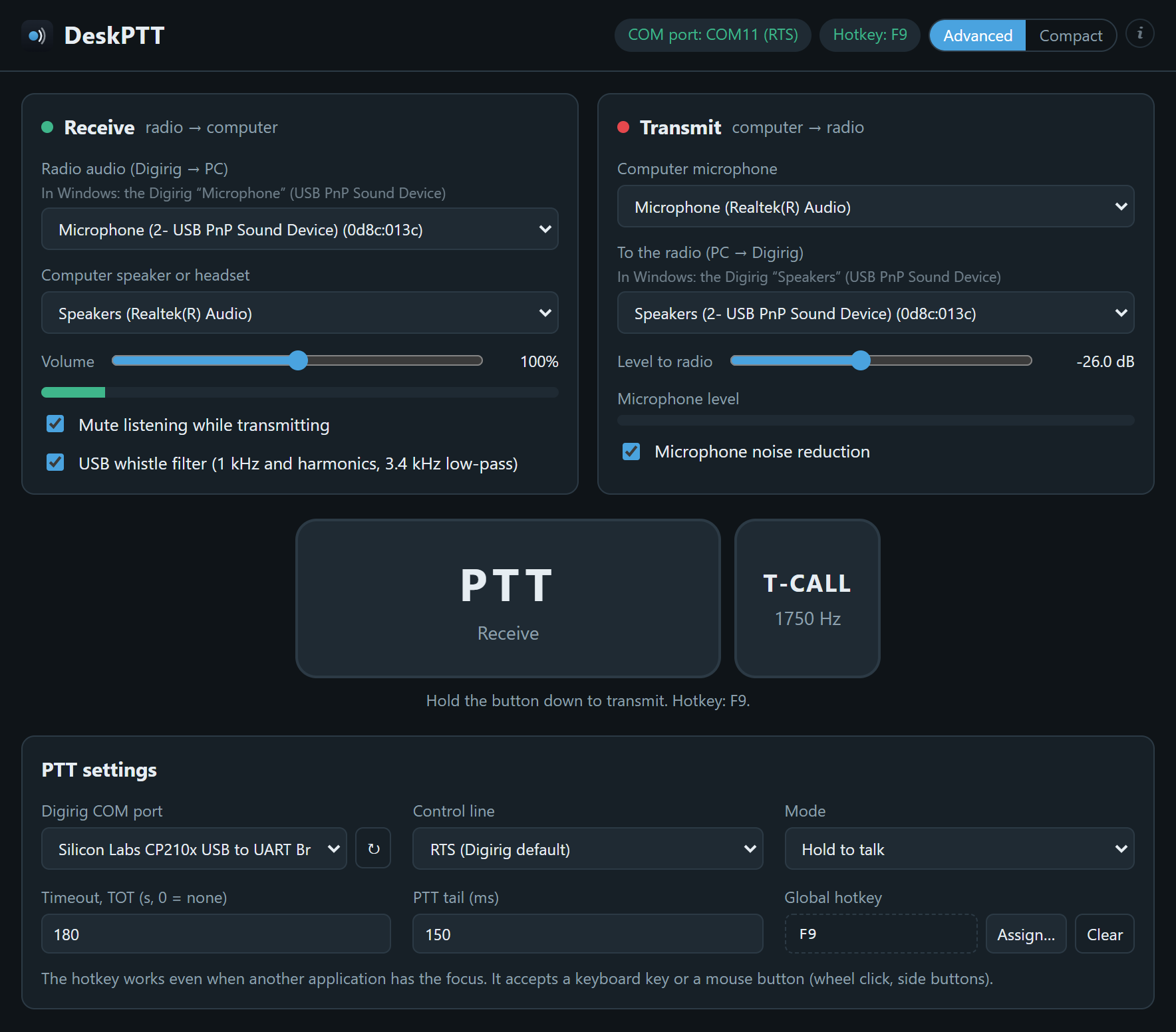
Radio audio to your speakers or headset, with volume control and a filter against the 1 kHz USB whistle of cheap codecs.
Transmit
Your PC microphone to the radio, with a level set in dB, a live level meter and optional noise reduction.
PTT your way
On-screen button or a global hotkey — keyboard key or mouse side button — that works even when another app has the focus. Hold-to-talk or toggle.
Repeater-friendly
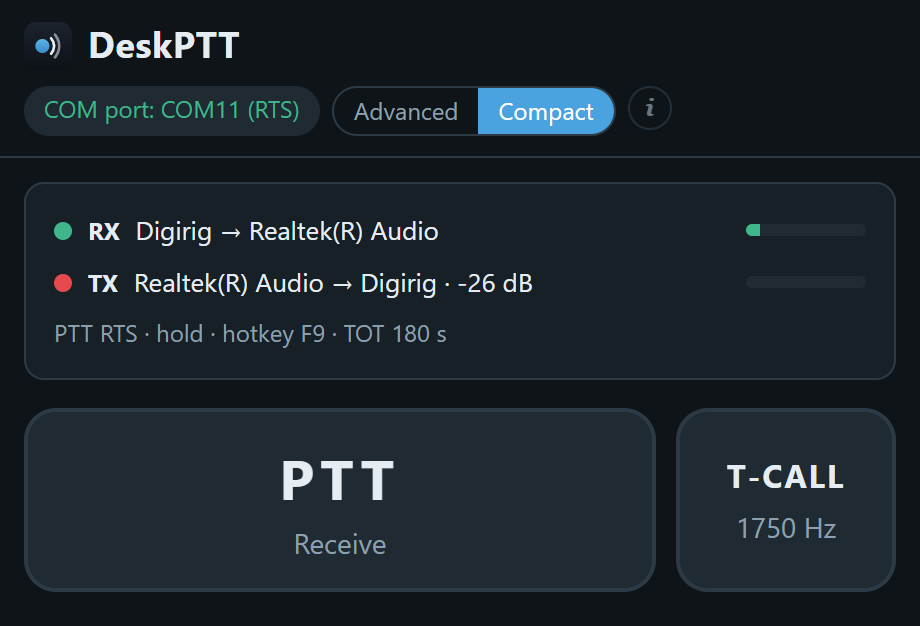
T-CALL 1750 Hz tone button, time-out timer (TOT) and adjustable PTT tail.
Fail-safe
PTT drops on crash, reload, port loss or exit. Lines are lowered as soon as the port opens.
Simple or detailed
Switch between the Compact and Advanced views. English and French interface.
Quick start
About five minutes, from download to your first transmission.
-
Connect the interface
Plug the audio interface into a USB port and into your radio's mic/speaker or data jack. Windows shows a USB sound card (often USB PnP Sound Device) and a COM port. If you use VARA, it is the same port.
-
Install DeskPTT
Download the installer and run it. It is not code-signed: if SmartScreen says Windows protected your PC, click More info → Run anyway. You can verify the file with the
.sha256published in the release. -
Pick the audio devices
Windows names the interface from the PC's point of view:
- Receive — Radio audio: the interface Microphone; Computer speaker or headset: your headset.
- Transmit — Computer microphone: your mic; To the radio: the interface Speakers.
DeskPTT pre-selects sensible defaults and never picks the interface for your headset.
-
Choose the COM port
In PTT settings, select the interface's COM port and choose the control line that keys your interface, usually RTS. The chip at the top turns green: COM port: COMx (RTS).
-
Set a hotkey (optional)
Click Assign… and press a key or a mouse side button. It keys the radio even while you are in another application.
-
Set your TX level
Hold PTT on a quiet frequency or into a dummy load and ask for a signal report. Start around −26 dB and adjust the Level to radio slider: interface inputs are sensitive, so a little goes a long way.
-
Enjoy
Switch to the Compact view and keep DeskPTT in a corner of the screen. Use T-CALL to open repeaters that need a 1750 Hz tone.
More details: README · Guide en français
FAQ
Which radios work?
Any transceiver you can feed audio to and key through the interface: most VHF/UHF FM mobiles and handhelds. DeskPTT was developed with an Icom ID-5200. It does not use CAT, so the radio model does not matter as long as the cable is right.
Your audio interface must also be able to key the PTT: DeskPTT drives it through a COM port line (RTS or DTR), as on interfaces that pair a CM108-type USB sound chip with a USB-serial chip. PTT through the CM108 chip's own GPIO pin is not supported yet. If your interface cannot key the radio, use the radio's VOX: DeskPTT still carries the audio both ways.
I hear a high-pitched whistle.
Many USB audio codecs leak 1 kHz USB frame noise. Keep USB whistle filter checked (on by default): it notches 1–4 kHz and low-passes at 3.4 kHz.
Can I use DeskPTT and VARA at the same time?
No: only one program can open the COM port. Close one before using the other.
Mac or Linux?
Windows 10/11 x64 today. A macOS version is planned; the code is open if you want to help.
Is it safe for my transmitter?
DeskPTT is designed to fail to “PTT off”: crash, reload, unplugged port or exit all release PTT, and the time-out timer cuts long transmissions. It is still experimental software for amateur radio use: you remain responsible for your station and your emissions.